

Dwg2ExcelExporter: Automated Data Extraction from AutoCAD Drawings to Structured Excel Reports
In any engineering discipline that runs on AutoCAD drawings, there is a reporting problem sitting just downstream of the design work. Information locked in drawing geometry – ...

In any engineering discipline that runs on AutoCAD drawings, there is a reporting problem sitting just downstream of the design work. Information locked in drawing geometry – dimensions, quantities, material codes, element counts, area calculations – has to reach spreadsheets so that project managers, procurement teams, and clients can act on it. Without automation, that transfer is a manual, error-prone, time-consuming task that no one enjoys and everyone underestimates.
InStandart developed Dwg2ExcelExporter: a custom AutoCAD plugin that scans drawings, extracts defined data, performs calculations on the extracted values, and generates structured Excel files – all without manual intervention. The reporting step that previously absorbed hours of engineering time per project now runs in seconds.
Project Summary
| Business Goal: | Automate data extraction from AutoCAD drawings into structured, calculation-ready Excel reports |
| Integration: | Autodesk AutoCAD – reads live drawing data directly via the .NET API |
| Output: | Customised Excel files structured by data type, with built-in calculations and formatted for reporting |
| Team: | 1 developer, 1 project manager |
| Core Technologies: | C#, .NET WPF, AutoCAD .NET API, Windows Forms, Excel Interop / OpenXML |
The Problem: Engineering Data Trapped Inside AutoCAD Drawings
AutoCAD drawings are the primary record of engineering intent – but they are not directly usable for reporting, procurement, or project management. The data needed for those workflows is embedded in the drawing geometry and attributes. Getting it out and into a usable format has traditionally meant manual work, and that work has a predictable set of failure modes:
- Time-Consuming Manual Data Extraction. Engineers and designers spent significant time reading values off AutoCAD drawings – dimensions, counts, material specifications, layer attributes – and transcribing them into Excel spreadsheets by hand. For drawings with high element counts or multiple data categories, this process could consume several hours per drawing set. Across a project with dozens of drawings, the cumulative time cost was substantial and entirely non-value-adding.
- Transcription Errors with Real Downstream Consequences. Manual re-entry is inherently error-prone. A misread dimension, a transposed digit, or a missed element would propagate through every downstream calculation and report built on that data – incorrect material quantities reaching procurement, wrong area figures reaching cost estimation, inaccurate counts reaching the bill of materials. Errors were often not detected until they caused a visible problem, by which point correction required rework of multiple documents.
- No Standardised Calculation Process. Once data was extracted, the calculations performed on it – geometric measurements, quantity derivations, cost estimations – were done manually or through ad-hoc Excel formulas that varied by engineer and by project. There was no standardised calculation process, which meant that the same input data could yield different results depending on who performed the analysis and which version of the spreadsheet template they used.
- Reports Lagged Behind Drawing Revisions. When drawings were revised – a routine occurrence in any live engineering project – the corresponding Excel reports had to be manually updated to reflect the changes. This required identifying which data had changed, extracting the new values, and re-running calculations. In practice, reports often lagged behind the current drawing revision, meaning project decisions were made on data that no longer reflected the latest design.
The Solution: Dwg2ExcelExporter – AutoCAD Plugin with Extraction, Calculation, and Reporting
InStandart developed Dwg2ExcelExporter as a purpose-built AutoCAD plugin that covers the full pipeline from drawing data to finished Excel report – extraction, transformation, calculation, and file generation – without requiring any manual steps in between. The solution has four core components:
- Automated Data Extraction Engine
The plugin scans the active AutoCAD drawing systematically, identifying and extracting relevant information based on predefined criteria – layer names, entity types, block attributes, text values, geometric properties, and custom object data. Extraction is non-destructive and operates directly on the drawing file via the AutoCAD .NET API, requiring no export step and no modification of the source drawing. The criteria for what to extract are configurable, allowing the tool to be adapted to different drawing standards and data requirements across project types.
- Data Transformation Layer
Raw data extracted from AutoCAD drawings is rarely in the format required for reporting. The transformation layer processes the extracted values before any calculation or output step:
- Unit conversion – drawing units to reporting units (e.g., mm to metres, square units to area)
- Data structure normalisation – mapping AutoCAD entity properties to report column schema
- Predefined rule application – categorising elements, applying naming conventions, resolving ambiguities
- Data validation – flagging incomplete or unexpected values before they reach the report
This transformation step ensures that what reaches the calculation engine and the Excel output is clean, correctly structured, and consistent regardless of how the source drawing was produced.
- Built-In Calculation Engine
Before generating the Excel file, Dwg2ExcelExporter applies a calculation engine to the transformed data. The calculations are defined in the plugin configuration and execute automatically – engineers do not need to build or maintain Excel formulas. Supported calculation types include geometric measurements derived from entity dimensions, quantity aggregations across element categories, material volume and area derivations, and cost estimations based on configured unit rates. Because calculations run in the plugin rather than in the spreadsheet, the results are consistent across every report generated, regardless of the Excel template or user.
- Structured Excel File Generation
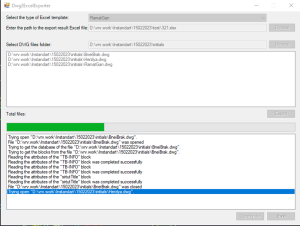
The final output is an Excel file generated programmatically – not a raw data dump, but a structured, formatted report shaped to the type of data extracted. The plugin selects the appropriate output format based on the data category, applies column headers, number formatting, and summary rows, and produces a file that is immediately readable and usable by its intended audience – whether that is a procurement team, a project manager, a cost estimator, or a client. When a drawing is revised, re-running the plugin regenerates the report in seconds, replacing the previous version with data that reflects the current drawing state.
Results
Measured against the manual extraction and reporting workflows the plugin replaced:
| Metric | Before | After |
| Data extraction from drawings | Manual – hours per drawing set | Automated – seconds per drawing |
| Transcription errors in reports | Recurring – manual re-entry risk | Eliminated – no manual data handling |
| Calculation consistency | Variable – engineer-dependent
formulas |
Standardised – same engine, same results every time |
| Report update on drawing revision | Manual re-extraction and recalculation required | Re-run plugin – report regenerated in seconds |
| Engineer time on reporting tasks | Significant – hours absorbed per
project |
Near zero – freed for design and analysis work |
| Report structure and formatting | Inconsistent across engineers and
projects |
Standardised – template-driven output every time |
Additional operational improvements:
- Reports always reflect the current drawing revision – no lag between design changes and the data that reaches procurement or project management
- Downstream teams – procurement, cost estimating, project management – receive structured, calculation-complete data without chasing engineers for updates
- Audit trail is implicit: the report is generated from the drawing, so the source of every figure is traceable back to specific drawing elements
- New team members can produce correct, consistent reports from day one – output quality is not dependent on individual experience with the data or the spreadsheet template
Why This Problem Is Hard (and Why a Generic Data Export Doesn’t Solve It)
AutoCAD has built-in data extraction tools. Excel has import connectors. So why did this require a custom plugin rather than a combination of standard tools?
- AutoCAD’s Native Export Is a Data Dump, Not a Report. AutoCAD’s built-in data extraction wizard exports raw entity properties to a table – it does not transform, calculate, or format them into anything a non-engineer can use directly. Getting from a raw attribute export to a structured, calculation-complete report still requires significant manual work. The custom plugin covers the entire pipeline, not just the first step.
- Calculations Must Run Before the Report Is Generated. The calculations needed for reporting – area derivations, quantity aggregations, cost estimations – depend on the extracted data in ways that cannot be expressed as static Excel formulas applied after the fact. They need to run on the live extracted values, account for the relationships between drawing elements, and produce results that are embedded in the report structure. This requires a calculation engine integrated into the extraction pipeline, not a formula layer added in Excel afterwards.
- Data Extraction Criteria Are Project-Specific. What information to extract from a drawing – which layers, which block attributes, which entity types – is determined by the drawing standards and data model of the specific discipline and organisation. A generic extraction tool works against a generic data model. A custom plugin works against the actual drawing structure, using configurable criteria that match how the client’s drawings are structured and what data they need from them.
- Output Format Must Match the Downstream Workflow. The Excel file that reaches procurement looks different from the one that reaches cost estimation, which looks different from the one that goes to a client. A generic export produces one format. The custom plugin selects the appropriate output structure based on the type of data extracted, producing a report that fits directly into the workflow of the team that will use it – without reformatting or manual adjustment.
Applicability: Where This Approach Works
The AutoCAD-to-Excel extraction and reporting architecture developed for this project applies wherever engineering drawing data needs to flow into structured reports, calculations, or downstream business processes – and where that flow is currently manual:
- Structural Engineering. Extracting member dimensions, section properties, and connection counts from structural drawings for material takeoffs, cost estimation, and fabrication scheduling – without manual quantity surveying from drawings.
- MEP & Building Services. Automating the extraction of duct lengths, pipe runs, equipment schedules, and fixture counts from mechanical, electrical, and plumbing drawings for procurement and installation planning.
- Civil & Infrastructure. Generating earthworks volume calculations, road geometry reports, and utility quantity schedules directly from civil drawing sets – replacing manual measurement and spreadsheet assembly.
- Manufacturing & Fabrication. Extracting part lists, material specifications, and dimensional data from manufacturing drawings to feed directly into production planning, procurement, and quality documentation workflows.
- Oil, Gas & Process Engineering. Pulling equipment tags, line numbers, instrument lists, and pipe specifications from P&ID and layout drawings into structured registers – replacing manual data entry into asset management and procurement systems.
- Any AutoCAD-Based Workflow. Any organisation where engineers spend time extracting data from drawings and building reports in Excel – regardless of discipline – is a direct candidate for this automation approach.
Related Case Studies
POSforAFS: Automated Formwork Calculation for AutoCAD