

Keraglass: Automating Glass Embossing Drawing Preparation Inside AutoCAD
Preparing drawings for glass embossing printers is meticulous, repetitive work. Every project required engineers to manually lay out circle patterns along complex glass contou...
Preparing drawings for glass embossing printers is meticulous, repetitive work. Every project required engineers to manually lay out circle patterns along complex glass contours, fill areas by hand, and re-enter parameters from scratch for each new order. The process was slow, error-prone, and impossible to standardise across a team.
InStandart developed a custom AutoCAD plugin for Keraglass that automates pattern generation, solid area filling, and parameter management — directly inside the AutoCAD environment engineers already use. Drawing preparation that previously demanded hours of manual drafting is now driven by a handful of input parameters and completed in minutes.
Project Summary
| Industry: | Specialised Glass Manufacturing |
| Business goal: | Automate drawing preparation for glass embossing printer transfer |
| Platform: | AutoCAD 2020–2024, Windows OS |
| Team: | 1 developer, 1 project manager |
| Core Technologies: | C#, .NET WPF, AutoCAD .NET API, Windows Forms, Network Licensing |
The Problem: Manual Drawing Preparation for Every Glass Embossing Order
Glass embossing is a precision manufacturing process in which patterns are printed directly onto glass surfaces. The input to the embossing printer is a technical drawing — a precisely laid-out arrangement of circles and filled areas that defines the texture and visual pattern to be applied. Preparing that drawing manually created a set of interlocking problems that accumulated across every project:
- Time-Consuming Pattern Layout by Hand. Every embossing order required an engineer to manually place circles along the contour of the glass geometry in AutoCAD — determining start and end diameters, spacing, row count, and offset from the edge, then drawing each element individually. For complex glass shapes or multi-row patterns, this could consume hours of skilled drafting time per drawing. Repeat orders with different dimensions required starting from scratch.
- Error-Prone Manual Fill Processes. Filling closed polyline areas with solid hatches — a necessary step in preparing drawings for the embossing printer — was done manually and was prone to selection errors, missed areas, and inconsistent application. A single missed or incorrectly filled zone in a drawing would produce a defective embossing output, requiring the job to be rerun.
- No Parameter Reuse Across Projects. Parameters defining circle size, spacing, and row configuration had to be re-entered from memory or transcribed from notes for every new order. There was no system for saving and reusing parameter sets — meaning that replicating a previously successful pattern on a new glass shape required the engineer to reconstruct the configuration manually, with no guarantee of exact consistency.
- Licensing and Access Control Gaps. As the team using the tools grew, managing who had access to the drawing preparation tools — and ensuring that access could be administered centrally without per-seat software installations — became an operational friction point. There was no structured licensing mechanism to support multi-user access within the organisation.
The Solution: Custom AutoCAD Plugin with Parametric Pattern Generation
InStandart developed a purpose-built AutoCAD plugin that integrates directly into the existing drafting environment used by Keraglass engineers. The plugin adds four core capabilities to AutoCAD, covering every step of the drawing preparation workflow — from area filling through to pattern generation, parameter management, and deployment licensing:
- Automated Area Fill (Solid Hatch). A dedicated command enables engineers to select one or more closed polylines and automatically fill them with solid hatches in a single operation. What previously required manual hatch placement — with the associated risk of missed areas or incorrect boundary selection — is reduced to a selection and a single command execution. The result is consistent, error-free solid fills across the entire drawing, every time.
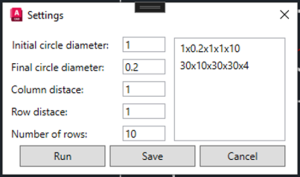
- Parametric Circle Pattern Generation. The core of the plugin is a pattern generation command that automates the creation of multi-row circle arrays along any glass contour. The engineer selects a polyline defining the glass edge, specifies an offset side, and enters the pattern parameters. The software generates the complete pattern automatically: Start circle diameter and end circle diameter (graduated sizing along the contour); Distance between circles within a row; Distance between rows; Number of rows to generate. The plugin handles all geometry calculations — circle positioning, spacing distribution, contour-following offset — and places every element accurately without manual intervention. Patterns that previously took hours to draft are generated in minutes from a small set of inputs.
- Parameter Storage and Import/Export. All pattern parameters are stored directly within the AutoCAD drawing file — no external configuration files, no separate databases, no risk of parameters becoming separated from the drawing they belong to. A full import/export system allows engineers to save parameter sets, share them across the team, and apply proven configurations to new orders without re-entering values. Replicating an existing pattern on a new glass shape is a matter of loading saved parameters and selecting the new contour.
- Network Licensing System. The plugin includes a network licensing implementation that supports multi-user deployment within the organisation. Licences are managed centrally — administrators control access without requiring per-machine installations or manual licence key distribution. Users across the team connect to the licence server and the plugin activates automatically, with no per-seat configuration overhead.

Results
Measured against the manual drawing preparation workflow the plugin replaced:
| Metric | Before | After |
|---|---|---|
| Circle pattern generation time | Hours of manual drafting per drawing | Minutes — parametric generation from inputs |
| Manual drawing errors | Recurring — missed fills, misplaced elements | Eliminated — automation removes the error source |
| Parameter consistency across projects | Manual re-entry, inconsistent replication | Saved parameter sets — exact reuse on demand |
| Solid fill accuracy | Prone to missed or incorrect areas | 100% coverage — automated selection and fill |
| Multi-user access management | No central control mechanism | Network licensing — centrally administered |
| Drawing preparation workflow | Skills-dependent, variable output quality | Standardised — consistent output regardless of operator |
Additional operational improvements:
- Faster response to client orders — drawing preparation is no longer a bottleneck that delays production scheduling
- Reduced dependency on individual drafting expertise — new team members can produce correct drawings from day one using the plugin’s guided parameter inputs
- Drawings are self-contained — parameters stored in the file mean any engineer can open a previous drawing and understand or reproduce the configuration without reference to external notes
- Centrally managed licensing scales with the team — adding new users requires no per-machine setup, just licence allocation from the server
Why This Problem Is Hard (and Why a Generic AutoCAD Macro Doesn’t Solve It)
Automating repetitive CAD tasks sounds straightforward — AutoCAD supports macros and scripts. So why did this require a purpose-built plugin rather than a scripted workflow or an off-the-shelf pattern tool?
- Contour-Following Geometry is Non-Trivial. Placing circles along the contour of an arbitrary glass shape — maintaining consistent spacing, handling curves, corners, and direction changes — requires geometry calculations that go well beyond what a standard AutoCAD macro can handle. The plugin must evaluate the polyline geometry dynamically and distribute elements correctly regardless of the shape’s complexity.
- Graduated Sizing Requires Per-Element Calculation. The pattern specification includes start and end circle diameters that vary along the contour length. Calculating the correct diameter for each circle position — interpolating smoothly between start and end values as the pattern progresses — requires per-element computation that a simple repeat-command approach cannot produce.
- Parameters Must Live Inside the Drawing. A generic scripting approach would store parameters externally — in a text file, a spreadsheet, or a configuration file. This creates version control problems when drawings are archived, shared, or revisited months later. Storing parameters within the DWG file itself required custom data embedding using the AutoCAD .NET API — a capability that requires proper plugin development, not scripting.
- Network Licensing Requires Infrastructure. Deploying a tool across a multi-user engineering team with central access control — without per-seat installation overhead — requires a purpose-built licensing layer. This is a non-trivial software component that needs to be integrated with the plugin’s activation logic and tested against the organisation’s network environment.
Applicability: Where This Approach Works
The parametric AutoCAD plugin architecture developed for Keraglass applies wherever a manufacturing or fabrication workflow depends on drawing preparation that is geometry-driven, repetitive, and currently performed manually inside AutoCAD:
- Glass & Surface Printing. Manufacturers using CNC engraving, sandblasting, or digital print systems where the input is a CAD-prepared drawing — and where pattern layouts repeat across orders with varying parameters.
- Laser & Waterjet Cutting. Fabricators preparing cut path drawings for laser or waterjet machines, where standard patterns or features need to be positioned along contours or within bounded areas for different job geometries.
- Decorative Metal Fabrication. Companies producing perforated screens, decorative panels, or patterned metalwork where hole or feature arrays need to be generated along irregular perimeters or within defined zones for each custom order.
- Architectural Facade & Cladding. Facade manufacturers and cladding suppliers who prepare panel drawings with repeating perforation or embossing patterns that vary by panel size and client specification — where parametric automation replaces per-panel manual drafting.
- Any Custom Manufacturing with CAD-to-Machine Workflows. Any manufacturer where the production input is an AutoCAD drawing and where drawing preparation involves placing, sizing, or configuring geometric elements according to parameters that vary by order — the plugin model applies directly.