

Integration of CAD/BIM with SAP for a Midstream Gas Processing Plant
A leading oil and gas company was developing a new gas processing plant. Their engineering team worked in AutoCAD Plant 3D, while operations and procurement ran on SAP S/4HANA...

A leading oil and gas company was developing a new gas processing plant. Their engineering team worked in AutoCAD Plant 3D, while operations and procurement ran on SAP S/4HANA. The two systems didn’t talk to each other – and that gap was costing the project thousands of engineering hours, a 15% error rate on Bills of Materials, and 6+ weeks of delays on every asset handover.
InStandart built a custom integration platform that connected these systems bi-directionally, automating data flow between engineering and enterprise environments. This page documents exactly what the problem was, how we solved it, and what changed.
Project Summary
| Industry: | Oil & Gas — midstream gas processing |
| CAD/BIM Platform: | Autodesk AutoCAD Plant 3D |
| Enterprise System: | SAP S/4HANA (asset management, material management, procurement) |
| Project Scope: | Custom bi-directional integration platform between CAD and ERP |
| Core Technologies: | C# / .NET Framework, AutoCAD Plant 3D SDK, SAP OData/REST APIs, SQL Server, custom mapping engine |
The Problem: Data Silos Between Engineering and Enterprise Systems
Engineering data and enterprise data lived in completely separate worlds. This is a common pattern in oil & gas and EPC projects, but the scale of the problem here was significant:
- Data silos. Equipment specifications, P&IDs, and Bills of Materials resided in AutoCAD Plant 3D. Procurement data, material masters, and maintenance records lived in SAP S/4HANA. There was no automated connection between the two systems.
- Manual re-entry with high error rates. Every Engineering Bill of Materials (EBoM) had to be manually re-entered into SAP. With thousands of line items per package, this process took approximately 4 hours per BoM package and produced error rates around 15%. These weren’t minor typos – errors in material codes, equipment IDs, and specifications cascaded into incorrect procurement orders and rework downstream.
- No real-time visibility. Project managers had no way to see material availability or procurement status during the design phase. Decisions were made on stale data, leading to over-ordering, under-ordering, and schedule conflicts.
- Delayed asset handover. The handover from engineering to operations was consistently delayed by 6+ weeks because asset data had to be reformatted, validated, and manually entered into SAP to meet compliance and categorization standards.
The Solution: Bi-Directional CAD–SAP Integration Platform
InStandart developed and deployed a custom integration platform with four core components:
Bi-directional data synchronization
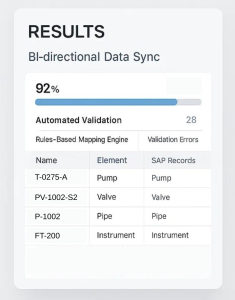
Automatic extraction and synchronization of Bills of Materials, equipment IDs, and asset metadata between AutoCAD Plant 3D and SAP S/4HANA. Changes in the CAD model propagate to SAP, and updates in SAP (material availability, procurement status) are reflected back into the engineering environment.
The sync engine uses the AutoCAD Plant 3D SDK to extract model data programmatically – not through manual export/import cycles – ensuring that the data is always current and complete.
Rules-based mapping engine
A custom mapping engine converts CAD elements (line numbers, equipment tags, pipe specs, instrument IDs) into SAP-compliant material master data and equipment records. This mapping handles:
- Naming convention translation between CAD and SAP standards
- Material classification and categorization according to SAP master data structures
- Automatic assignment of procurement codes, cost centers, and location hierarchies
- Handling of edge cases where CAD elements don’t have direct SAP equivalent
Automated validation pipeline
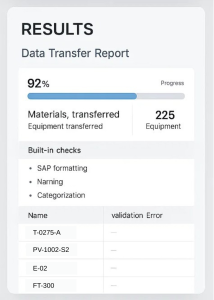
Before any data transfer, built-in validation checks ensure that every record meets SAP formatting, naming, and categorization standards. Records that fail validation are flagged with specific error descriptions rather than silently entering the system with bad data. This validation layer is what drove the error rate from 15% down to under 2%.
Live dashboards
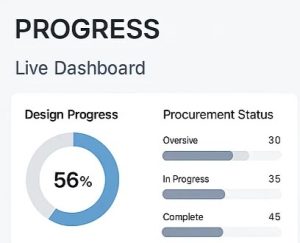
Real-time tracking of design progress, procurement status, and asset readiness across both systems. Project managers can see – in one view – which equipment is designed, which materials are ordered, what’s been received, and what’s pending handover.
The client’s engineering leadership described the integration as a step-change in their data management workflow.
Results
Here is what changed after deploying the integration platform, measured against the same workflows before automation:
- BoM data entry time: from ~4 hours to under 15 minutes per package. What previously required an engineer to manually re-enter hundreds of line items into SAP now happens automatically with validation. The engineer’s role shifted from data entry to reviewing and approving automatically generated records.
- Manual data errors: from ~15% to under 2%. The automated validation pipeline catches formatting, classification, and naming issues before data enters SAP. The remaining <2% of errors are edge cases related to non-standard equipment that falls outside the mapping rules – these are flagged for manual review rather than silently entering the system.
- Engineering-to-procurement handover: from 6+ weeks to 1 week. The combination of automated data transfer, validation, and SAP-compliant formatting eliminated the manual reformatting and compliance checking that was the primary cause of handover delays.
- Asset registration in SAP: from ~10 days per project to same-day registration. Once engineering data is validated and mapped, asset registration in SAP happens automatically – no manual form-filling or data re-entry required.
- At an average engineering rate of 100$/hour, this translates to approximately $120 000 in annual cost savings from labor alone – excluding procurement error reduction and accelerated handover.
Additional operational improvements:
- Procurement delays reduced by 25% due to faster and more accurate material planning based on real-time data from the CAD model
- Seamless digital handover at commissioning phase – no paper-based or spreadsheet-based intermediate steps
- Enhanced traceability for audits and regulatory compliance – every data transfer is logged with timestamps, source records, and validation results
- Improved collaboration between engineering and operations teams who now work from the same data source
Why This Problem Is Hard (and Why Off-the-Shelf Doesn’t Solve It)
CAD-to-ERP integration is a well-known need in oil & gas and EPC projects. So why doesn’t everyone just buy an off-the-shelf connector?
- Schema mismatch. AutoCAD Plant 3D and SAP S/4HANA use fundamentally different data models. A “pipe” in Plant 3D is a geometric object with engineering properties. A “pipe” in SAP is a material master record with procurement attributes. Mapping between these representations requires deep understanding of both systems and the business rules that connect them.
- Project-specific logic. Every oil & gas company has its own naming conventions, material classification systems, procurement workflows, and compliance requirements. A generic connector can handle basic data transfer, but it cannot handle the project-specific rules that determine whether the data is actually usable on the SAP side.
- Validation complexity. SAP has strict requirements for data formatting, categorization, and completeness. Data that is perfectly valid in AutoCAD may fail SAP validation for dozens of different reasons. Building a validation layer that catches these issues before transfer – rather than after – requires SAP domain knowledge combined with CAD API expertise.
- Bi-directional requirements. Most simple integrations are one-way: export from CAD, import to SAP. But real workflows need bi-directional sync. When procurement updates a material status in SAP, the engineer needs to see that change reflected in the design environment. This requires persistent connections and change-tracking logic that goes beyond file-based export/import.
Applicability: Where This Approach Works
The integration architecture developed for this project is applicable across multiple scenarios:
- Oil & Gas – connecting AutoCAD Plant 3D, AVEVA E3D, or Intergraph Smart 3D with SAP S/4HANA, Oracle ERP, or SAP Ariba for procurement and asset management.
- Construction & EPC – synchronizing Revit or Plant 3D models with ERP systems for real-time BoM tracking, cost estimation, and procurement planning.
- Industrial manufacturing – bridging design tools with MES, ERP, and quality management systems for automated work order generation and material tracking.
- Facility management – connecting BIM models (Revit, Plant 3D) with CMMS platforms (Maximo, Archibus, SAP PM) for automated asset registration and maintenance planning.
Related Case Studies
- Automated Formwork Calculation (POSforAFS) – Algorithm-driven automation of formwork calculations using AutoCAD, achieving 85% faster turnaround and 70% cost reduction in the construction industry.
- Automated Data Export from AutoCAD to Excel (Dwg2ExcelExporter) – Custom tool for extracting, transforming, and exporting CAD data into structured Excel reports with built-in calculations.
- CAD Automation for Glass Embossing (Keraglass) – Automated drawing preparation for specialized manufacturing with parameter management and network licensing.
Talk to Us About Your Integration Challenge
If your engineering team is dealing with disconnected CAD and ERP systems — manual data re-entry, error-prone handovers, or lack of visibility between design and procurement — we can help you scope a solution.
We work with AutoCAD, AutoCAD Plant 3D, Revit, AVEVA E3D, and Intergraph Smart 3D on the CAD side, and SAP S/4HANA, Oracle ERP, and custom PLM systems on the enterprise side.