

CAD in Engineering and Product Design
Introduction In the world of product engineering and design, innovation is constant. Computer-aided design (CAD) has become the cornerstone of this evolution. It bridges the g...
Introduction
In the world of product engineering and design, innovation is constant. Computer-aided design (CAD) has become the cornerstone of this evolution. It bridges the gap between ideas and reality, giving professionals the ability to create, test, and refine designs with astonishing accuracy.
CAD platforms – AutoCAD, Revit, AVEVA E3D, SolidWorks – provide the foundation. But in construction, oil and gas, and manufacturing, the real productivity gains increasingly come from what engineering teams build on top of these platforms: custom plugins for automated calculations, CAD-to-ERP data synchronization, interdisciplinary clash detection, and AI-driven training simulators. This article covers both standard CAD capabilities and the custom automation layer that determines whether a CAD investment delivers 50% or 100% of its potential value.
Role of CAD in Engineering
CAD is not just a tool; it is a game changer. Engineers rely on CAD software to develop complex designs that were once impossible or time-consuming. The software can create detailed 2D drawings and complex 3D models, giving professionals the ability to visualise and analyse their designs in depth.
For example, in mechanical engineering, CAD allows for the design of complex machines. Designers can virtually test components, reducing the need for physical prototypes. This saves time and resources. What’s more, CAD easily integrates with simulation tools, allowing for stress testing and performance analysis before actual production begins.
In practice, the bottleneck in engineering CAD workflows isn’t the design itself – it’s what happens after design. Data transfer between CAD and enterprise systems, BoM compilation, cross-discipline coordination, and report generation consume disproportionate engineering hours. A midstream gas processing plant project found that BoM data entry alone took 4 hours per update with 15% error rates – not because AutoCAD Plant 3D couldn’t generate the data, but because there was no automated path from CAD to SAP. A custom integration plugin compressed this to 15 minutes with errors below 2%.
CAD in Product Design: Fostering Creativity and Precision
In product design, creativity meets practicality. CAD supports both. Designers can translate their ideas into tangible concepts faster and more accurately. The software makes it easy to experiment with shapes, sizes, and materials. With CAD, customising a design is effortless, allowing for multiple iterations in a short time.
In addition, CAD ensures consistency in product design. By using templates and libraries of standard components, designers maintain consistency. For industries such as automotive or consumer electronics, this consistency is critical. It meets branding and functionality requirements.
For specialized manufacturing – like glass embossing or formwork for concrete construction – CAD’s standard capabilities cover basic modeling, but the domain-specific logic that makes designs production-ready requires custom automation. One construction firm automated formwork panel selection and optimization directly inside AutoCAD, reducing formwork calculation costs by 70% and turnaround by 85%. The CAD platform provided the geometric foundation; the custom algorithm provided the engineering intelligence.
Advantages of Using CAD
CAD benefits go beyond efficiency. Here’s a more detailed overview:
- Increased accuracy: CAD reduces human error. It offers tools for precise measurements and accurate alignment, ensuring that designs meet strict specifications.
- Cost-effective: By minimising the need for physical prototypes, CAD reduces costs. Virtual testing also prevents costly errors during the manufacturing process.
- Collaboration: Modern CAD software allows teams to collaborate in real time. Designers, engineers, and clients can access the same files, make suggestions, and make changes instantly. In multi-discipline projects — where piping, structural, electrical, and instrumentation teams work on the same facility — collaboration means more than shared files. It requires interdisciplinary clash detection with version control, so that a resolved clash in one discipline is automatically reflected across all views. A custom 3D model review tool built for a gas processing facility improved cross-team coordination by 90%, reduced review time by 50%, and cut duplicate clash reports by 90%.
- Integration with manufacturing: CAD files integrate directly with computer-aided manufacturing (CAM) systems. This integration streamlines manufacturing processes, from CNC machining to 3D printing.
Key Applications of CAD Across Industries
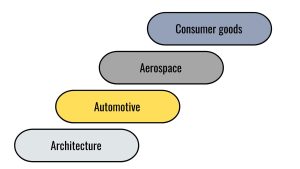
CAD applications are vast and varied. Different industries use CAD in unique ways:
- Architecture: Architects use CAD to create drawings and 3D models of buildings. This allows for virtual walkthroughs and improved presentations.
- Automotive: CAD helps design vehicles with aerodynamics and safety in mind. Engineers test features like crashworthiness and fuel efficiency using simulations.
- Aerospace: Precision is paramount in the aerospace industry. CAD ensures that every component, from fuselages to engines, meets stringent requirements.
- Consumer goods: From smartphones to furniture, CAD helps create aesthetically pleasing yet functional products.
Challenges in CAD Adoption
Despite its benefits, CAD is not without its challenges. Learning to use advanced CAD software requires training and practice. For smaller businesses, licensing costs can be significant. However, many overcome these obstacles by investing in training and implementing scalable solutions.
In addition, managing large CAD files can strain system resources. Engineers and designers must use reliable hardware to handle complex designs efficiently. Cloud solutions solve this problem by providing easier access and storage.
Future Trends in CAD
The future of CAD is exciting. With the advancement of artificial intelligence (AI), CAD systems are becoming smarter. AI-powered tools help designers by suggesting improvements and automating repetitive tasks. Virtual reality (VR) and augmented reality (AR) are also shaping the CAD landscape. These technologies provide immersive design experiences, making collaboration and presentation more efficient.
Another promising trend is generative design. This approach uses algorithms to explore multiple design options based on defined constraints. Not only does it stimulate creativity, but it also leads to innovative solutions that were previously unimaginable.

Where Standard CAD Ends and Custom Automation Begins
Standard CAD platforms handle geometry, modeling, simulation, and basic collaboration. They don’t handle: automated data synchronization with SAP, Oracle, or Teamcenter; domain-specific calculations like formwork optimization, pipe stress pre-screening, or material take-offs; automated extraction from drawings to structured Excel or procurement reports; or AI-driven operator training based on 3D model data.
These are the workflows where custom CAD automation delivers its highest ROI – because they affect every project, every day, and the cost of manual processing compounds across every engineering cycle.
Real results from custom CAD automation in engineering:
- CAD-to-SAP integration for a gas processing plant: data synchronization improved 85%, data-related reworks dropped 70%, BoM entry compressed from 4 hours to 15 minutes.
- Automated formwork calculation in construction: costs reduced 70%, turnaround improved 85%, 3-month workflows compressed to 1 day.
- 3D model review tool for multi-discipline projects: review time reduced 50%, manual errors cut 80%, cross-team coordination improved 90%.
- AI-driven operator training simulator: training time cut 50%, onboarding incidents reduced 80%, cost per operator down 60%.
- Automated data extraction from AutoCAD drawings: report preparation time from hours to minutes, formatting errors eliminated.
Conclusion
CAD has transformed engineering and product design – that’s established. The question for engineering teams in 2026 isn’t whether to use CAD, but how much of their CAD platform’s potential they’re actually capturing.
If your team uses AutoCAD, Revit, AVEVA E3D, or SolidWorks and still spends significant hours on manual data transfer, report formatting, calculation workflows, or cross-discipline coordination – that’s the gap where custom CAD automation delivers measurable results.
Explore how we approach CAD engineering automation or see real project examples from construction, oil & gas, and manufacturing teams.