

Custom Plugins for Oil & Gas CAD Platforms: Real Results From CAD-SAP Integration to Clash Detection
Introduction Engineering teams in oil and gas work across a fragmented toolchain: AutoCAD Plant 3D or AVEVA E3D for 3D modeling, CAESAR II for stress analysis, Aspen HYSYS for...
Introduction
Engineering teams in oil and gas work across a fragmented toolchain: AutoCAD Plant 3D or AVEVA E3D for 3D modeling, CAESAR II for stress analysis, Aspen HYSYS for process simulation, SAP S/4HANA for procurement and materials management. Each system works. The problem is what happens between them.
Manual data transfer between these platforms – re-entering Bills of Materials, reconciling P&ID data with 3D models, cross-referencing material specs against procurement catalogs – consumes a disproportionate share of engineering hours. On a typical midstream gas processing project, BoM data entry alone can take 4 hours per update, with manual error rates reaching 10–15%. Those errors cascade into incorrect purchase orders, construction rework, and schedule delays.
Custom plugins built directly into CAD platforms eliminate these gaps. This whitepaper covers where standard CAD falls short in oil and gas, five types of custom plugins with real project results (including BoM entry compressed from 4 hours to 15 minutes and error rates cut from 15% to under 2%), technical implementation considerations, and the challenges that determine whether a plugin project succeeds or fails.
Market Overview & Industry Trends
CAD platforms have become mission-critical across oil & gas engineering – from conceptual design through operations. In 2025:
- Around 80 % of top-tier oil & gas engineering firms use CAD for plant layout, piping, and structural design.
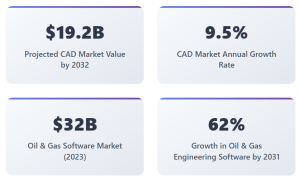
- The global CAD software market projected to reach US $19.2 bn by 2032, growing at a 9.5 % .
- The oil & gas software segment itself forecasted to grow at ~7.5 % CAGR through 2030.
- Specifically, oil & gas-specific engineering software – including CAD – is projected to grow from US $1.25 bn in 2024 to US $2.03 bn by 2031, at 6.9 %.
Main trends:
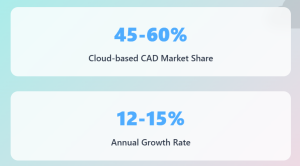
- Cloud & Collaboration. Cloud-based CAD holds 45-60 % market share, with adoption growing fastest – 12-15 % annual growth rate. Cloud-native tools and SaaS plugins facilitate real-time collaboration between offshore, EPC, and operations teams.
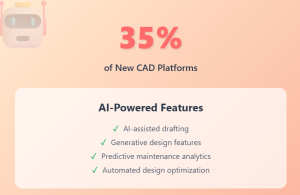
- AI/ML Integration. Around 35 % of new CAD platforms now embed AI-assisted drafting or generative design features. In oil & gas software, AI‑driven analytics and predictive maintenance are key growth drivers.
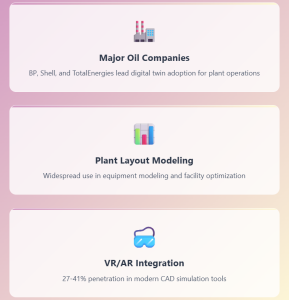
- Digital Twins & Simulation. Digital twins are widespread in major players like BP, Shell, and TotalEnergies, with use increasing in plant layout and equipment modeling. Simulation and VR/AR integration ranges from 27 % to 41 % penetration in modern CAD tools.
Role of CAD in Oil & Gas
CAD platforms in oil and gas are used for:
- Pipeline and facility layout design
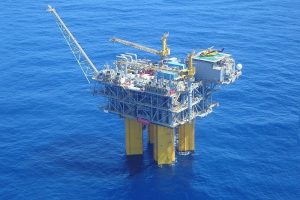
- 3D modeling of offshore and onshore rigs
- Structural and stress analysis simulations
- P&ID (Piping and Instrumentation Diagram) generation
- Clash detection and interference analysis
- Document control and revision history
Key platforms in this space include AutoCAD Plant 3D, AVEVA E3D, Bentley OpenPlant, and Intergraph Smart 3D. Yet these platforms often require adaptation to meet project-specific standards or client requirements.
Limitations of Generic CAD Platforms
Oil & gas projects involve highly specialized needs – such as:
- Clause-driven tagging (P&ID/instrument loops)
- Complex BOM generation meeting API/ASME requirements
- Pipeline hydraulics or thermal simulation
- Interoperability with ERP, PLM, GIS, and digital twin systems
Generic CAD platforms often force manual workarounds, causing delays, inconsistencies, and cost overruns.
The scale of these workarounds is often underestimated. In a midstream gas processing plant project, manual data transfer between engineering tools and SAP was causing frequent BOM and asset mismatches, delays in procurement and planning, and inefficient asset management.
The engineering-to-procurement handover alone stretched to over 6 weeks – not because the engineering was complex, but because data had to be re-entered and validated across disconnected systems. Similarly, on multi-discipline projects (piping, structural, electrical, instrumentation), interdisciplinary clash detection handled through manual review cycles was taking 3–5 days per iteration, with the same clashes often flagged multiple times because resolution tracking was done in spreadsheets rather than integrated into the review tool.
What Are Custom CAD Plugins?
Custom plugins are modular software extensions built to tailor existing CAD platforms to better suit oil and gas operations. Written in languages such as .NET, C++, Python, or LISP, these plugins can automate repetitive tasks, enforce standards, add domain-specific calculations, and integrate with third-party systems.
Plugin Types:
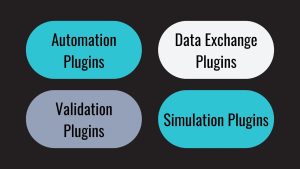
- Automation Plugins (e.g., automatic tag generation)
- Validation Plugins (e.g., standards compliance checks)
- Data Exchange Plugins (e.g., ERP or GIS sync)
- Simulation Plugins (e.g., pressure drop or thermal analysis)
A fourth category – often the highest-ROI – is worth highlighting separately: Training & Simulation Plugins that transform 3D CAD models into interactive operator training environments using engines like Unity 3D, with AI-driven behavior simulation based on P&ID and PFD data. The development stack for oil and gas CAD plugins typically includes .NET Framework and C# (natively compatible with both Autodesk and AVEVA APIs), Python for data processing and AI components, WPF for custom UI within the CAD environment, and direct API integration via AutoCAD API, Plant 3D SDK, AVEVA PML, and Smart 3D tools. Enterprise integration connects to SAP S/4HANA, Oracle ERP, Teamcenter, and procurement systems through custom mapping engines with bidirectional sync pipelines and rule-based validators. Case example
Key Benefits – With Measured Results From Real Projects
- Time Efficiency: From Hours to Minutes. Generic claim: “Automation saves time.” Measured result: On a midstream gas processing plant, a custom CAD-to-SAP integration plugin compressed BoM data entry from 4 hours to under 15 minutes per update – a 93% reduction. Engineering-to-procurement handover shortened from over 6 weeks to 1 week. These aren’t projections; they’re measured outcomes from a production deployment. Case example
- Error Reduction: From Double-Digit to Near-Zero. Manual data transfer between CAD and enterprise systems typically carries error rates of 10–15%. On the same gas processing project, automated validation and data exchange reduced manual errors from 15% to below 2%. Data synchronization improved by 85%, and data-related reworks dropped by 70%.
- Cross-Disciplinary Coordination: From Days to Hours. On multi-discipline projects, a custom 3D model review tool with integrated clash detection and version control reduced review time by 50%, cut manual errors by 80%, and improved cross-team coordination by 90%. Clash resolution cycles shortened from 3–5 days to under 1 day, and duplicate clash reports were reduced by 90%. Case example
- Compliance and Standards Validation. Custom rulesets can automatically validate designs against ASME, API, ISO, or project-specific standards – eliminating the manual review bottleneck that typically gates every design submission. This is particularly valuable in jurisdictions with strict regulatory requirements.
- Operational Training: Cutting Onboarding Time and Risk. Beyond design, custom plugins transform 3D CAD models into operator training simulators. An AI-driven training system built for an Air Separation Unit – using the facility’s 3D model, P&ID, and PFD data as its foundation – reduced training time by 50%, cut cost per operator by 60%, decreased onboarding incidents by 80%, and improved retention of procedures by 90%. Case example
Performance Gains: Statistics & Infographics
| Task | Time Saved | Error Reduction |
| Isometric Drawing | –60 % | –70 % |
| Tagging & Loop Numbering | –45 % | –80 % |
| BOM Compilation | –55 % | –65 % |
| Standard Checks | –50 % | –75 % |
Measured Results From InStandart Projects
| Metric | Before | After | Improvement |
| BoM data entry time (per update) | 4 hours | 15 minutes | 93% faster |
| Manual data errors | 15% | <2% | 87% reduction |
| Engineering-to-procurement handover | 6+ weeks | 1 week | 83% faster |
| Clash resolution cycle | 3–5 days | <1 day | 80%+ faster |
| Duplicate clash reports | Baseline | -90% | 90% reduction |
| Data synchronization accuracy | Baseline | +85% | 85% improvement |
| Operator training time (ASU) | Baseline | -50% | 50% reduction |
| Training incidents (ASU) | Baseline | -80% | 80% reduction |
Technical Considerations in Plugin Development
| Aspect | Considerations |
| Platform APIs | Understanding Autodesk ObjectARX, AVEVA E3D APIs, etc. |
| Data Schema | Aligning plugin logic with CAD data structures |
| UI/UX | Seamless UI within native CAD interface |
| Performance | Optimization for large datasets |
| Security | Protecting proprietary design data in plugins |
| Version Compatibility | Ensuring plugins work across CAD platform updates |
The most critical technical consideration – and the one most often underestimated – is platform API expertise. AutoCAD Plant 3D SDK, AVEVA PML, and Smart 3D tools each have distinct object models, event systems, and limitations. A function that takes 2 hours to implement in a standalone .NET application can take 2 weeks inside the CAD API due to transaction management, document locking, custom object handling, and version-specific behavior differences.
InStandart’s technical stack for oil & gas CAD plugins includes: .NET Framework and C# as the backbone (natively compatible with Autodesk and AVEVA APIs), Python for data processing, batch operations, and AI/ML components, WPF for custom UI within the CAD environment, and direct integration with SAP S/4HANA, Oracle ERP, Teamcenter, Ariba, and Maximo through custom mapping engines with bidirectional sync pipelines and rule-based validators.
Supported data formats include DWG, IFC, STEP, DGN, XML, Excel, and COBie. For operational integration, we support MQTT, OPC UA, and SCADA data streams for real-time connectivity with plant equipment and IoT sensors.
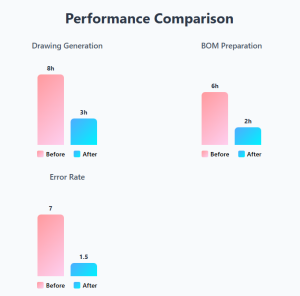
ROI and Productivity Metrics
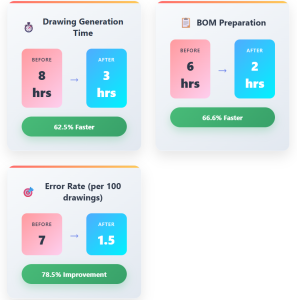
| Metric | Before Plugin | After Plugin | Improvement |
| Drawing generation time | 8 hours | 3 hours | 62.5% faster |
| BOM preparation | 6 hours | 2 hours | 66.6% faster |
| Error rate per 100 drawings | 7 | 1.5 | 78.5% improvement |
| Man-hours saved per project | — | 400+ hours | Significant ROI |
ROI:
Custom plugin investment: $25,000 – $100,000
Annual savings for mid-sized firm: $200,000+ in man-hours and rework
Real-World Results: InStandart Project Case Studies
CAD/BIM–SAP Integration: Midstream Gas Processing Plant
Challenge: Manual data transfer between engineering tools (3D models, P&IDs) and SAP S/4HANA was causing frequent BOM and asset mismatches, delays in procurement and planning, and inefficient asset management.
Solution: InStandart developed a custom integration tool that automatically synced 3D model, BOM, and P&ID data with SAP; automated asset tagging and material spec transfer; and eliminated manual input errors through rule-based validation.
Results: Data synchronization improved by 85%. Data-related reworks dropped by 70%. Procurement readiness improved by 60%. BoM data entry compressed from 4 hours to under 15 minutes. Error rates fell from 15% to below 2%. Engineering-to-procurement handover shortened from 6+ weeks to 1 week.
3D Model Review Tool: Multi-Discipline Gas Processing Facility
Challenge: Manual data transfer between engineering tools and SAP led to delays in procurement and planning, frequent data mismatches, and inefficient BOM and asset management. Interdisciplinary review across piping, structural, electrical, and instrumentation was handled through manual processes.
Solution: InStandart developed a custom 3D model review tool with integrated clash detection and version control that automatically synced 3D model, BOM, and P&ID data; ensured consistent materials, specs, and asset tags; and reduced manual intervention.
Results: Review time reduced by 50%. Manual errors cut by 80%. Cross-team coordination improved by 90%. Clash resolution shortened from 3–5 days to under 1 day. Duplicate clashes reduced by 90%.
AI-Driven Operating Simulator: Air Separation Unit
Challenge: High training costs and safety risks. No realistic or repeatable training scenarios. Long onboarding time for new operators.
Solution: InStandart built a Unity-based simulator using the facility’s detailed 3D model, P&ID, and PFD data. The system included interactive SOPs and emergency scenarios, an AI engine simulating real-time ASU behavior based on operator actions and system changes, and performance tracking for trainees.
Results: Training time cut by 50%. Cost per operator reduced by 60%. Onboarding incidents decreased by 80%. Retention of procedures improved by 90%.
Automated Data Extraction: CAD-to-Excel Reporting
Challenge: Engineers spending hours manually extracting data from AutoCAD drawings into Excel reports for procurement, regulatory filings, and project documentation.
Solution: A custom tool (Dwg2ExcelExporter) that extracts data directly from AutoCAD drawings, performs calculations, transforms data, and generates structured Excel files automatically.
Results: Data extraction time reduced from hours to minutes per report. Formatting errors from manual processing eliminated entirely.
Challenges That Determine Whether a Plugin Project Succeeds
The Integration Gap.
Major CAD vendors are adding features to their platforms. But real oil & gas workflows span AutoCAD Plant 3D, AVEVA E3D, CAESAR II, Aspen HYSYS, SAP, and Excel – often simultaneously. Making a plugin work across this ecosystem requires custom integration between systems that were never designed to communicate. This is consistently the most underestimated part of any implementation.
Legacy Data Quality.
ML models and automation algorithms need clean, consistently structured data. Most engineering departments have 10–20 years of designs stored across different CAD versions, file formats (DWG, DGN, IFC, STEP), and naming conventions. Data conversion and interoperability planning should be part of any plugin project scope – not an afterthought.
Domain-Specific Complexity.
General-purpose AI tools can generate basic scripts, but they consistently fail with tasks involving complex geometric calculations, CAD API edge cases, and multi-system integration logic. These are areas where deep platform-specific expertise is essential – and where 15+ years of CAD development experience makes the difference between a working system and an expensive prototype.
The Real Cost Equation.
Custom plugin investment typically ranges from $25,000 to $100,000. Annual savings for a mid-sized firm: $200,000+ in man-hours and rework. But the real cost factor isn’t the plugin itself – it’s the risk of building with a team that doesn’t understand oil & gas CAD workflows and has to learn your domain on your budget. Mitigation: phased development starting with highest-ROI modules (BOM export, tagging automation, or CAD-ERP sync), modular architecture for version compatibility, CI/CD testing across CAD platform updates, and partnership with a specialized development team rather than general-purpose outsourcing.
Future Trends Impacting Custom Plugins
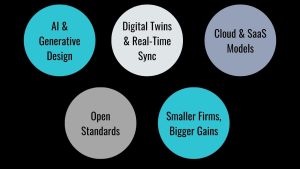
- AI & Generative Design: Plugins may provide intelligent routing, auto-correction, context-aware modeling.
- Digital Twins & Real-Time Sync: CAD plugins connected to live asset data are moving from major operators (BP, Shell, TotalEnergies) into mid-market adoption. InStandart has already built production systems in this space – including an AI-driven operating simulator for an Air Separation Unit that connects 3D CAD models, P&ID data, and real-time AI behavior simulation into a unified training environment.
- Cloud & SaaS Models: Plugins evolving into microservices accessed via the cloud.
- Open Standards / Interoperability: Plugins increasingly supporting IFC, ISO 15926, and PLM/GIS integration.
- Smaller Firms, Bigger Gains: SMEs now driving plugin adoption via cloud-first, pay-as-you-go models.
The pattern is clear: plugin capabilities are expanding. The competitive differentiator is not access to these technologies – it’s the ability to integrate them into end-to-end oil & gas workflows connecting design tools to enterprise systems, simulation environments, and operational processes.
Conclusion: From Reading to Implementation
The results documented in this whitepaper aren’t theoretical: BoM entry compressed from 4 hours to 15 minutes. Error rates cut from 15% to under 2%. Clash resolution cycles shortened from days to hours. Operator training incidents reduced by 80%. These are measured outcomes from production deployments in oil and gas facilities.
The practical question is the same one every engineering leader faces: does your team have the combination of CAD platform API expertise, oil and gas domain knowledge, and enterprise integration experience to build this internally – or is this a project where a specialized partner delivers faster and at lower risk?
InStandart has 15+ years of CAD development experience with 10+ CAD and engineering experts, 140+ completed projects, and direct API expertise in AutoCAD Plant 3D, AVEVA E3D, Intergraph Smart 3D, Revit, and SolidWorks. We integrate with SAP S/4HANA, Oracle ERP, Teamcenter, and operational systems via MQTT, OPC UA, and SCADA.
If your engineering team works with AutoCAD Plant 3D, AVEVA E3D, or Smart 3D and needs to automate workflows, integrate with SAP, or build custom tools that standard software doesn’t cover – explore our CAD services or see how we’ve solved similar challenges for other engineering teams.